
What you will learn
- Liquid-action formula
- Food ad style variables
- Image-to-video next step
Quick Answer
To write a strong liquid splash food ad prompt, separate the food subject, liquid action, motion quality, lighting, camera language, and platform format. The most reliable structure is: "Stream of [liquid] being poured onto [food subject], creating smooth flowing curves and splashes..." Then add style and format constraints after the visual action is clear.
What You Will Learn
- How to turn a static food idea into a commercial food advertising prompt.
- How to choose the liquid, food subject, style tag, and format language.
- How to convert the still image into a short image-to-video ad without overloading the motion prompt.
Prompt Formula
| Prompt part | What to write | Example |
|---|---|---|
| Food subject | The product or dish that must stay recognizable | gourmet burger, waffles, ice cream, coffee dessert |
| Liquid action | The visible movement that creates the ad moment | stream of melted cheese being poured |
| Motion quality | How the liquid should behave | smooth flowing curves and splashes |
| Texture and light | Details that make the image appetizing | glossy reflections, high-speed capture, studio lighting |
| Background | The commercial setting | dark elegant background, clean white ecommerce background |
| Style tag | The ad category or cuisine mood | ultra-premium fast food advertising style |
| Format | The publishing target | 1:1 feed post, 9:16 video frame, 16:9 banner |
Editorial note: this formula is based on Reemo food prompt tests and is meant as a repeatable writing structure, not a claim that every food category needs the same lighting or background.
Step 1: Define the Food Subject
Start with one clear food or product direction: burger, waffles, ice cream, cake, coffee dessert, pasta, salad, or a packaged snack. The subject should be specific enough that the model knows what must remain recognizable.
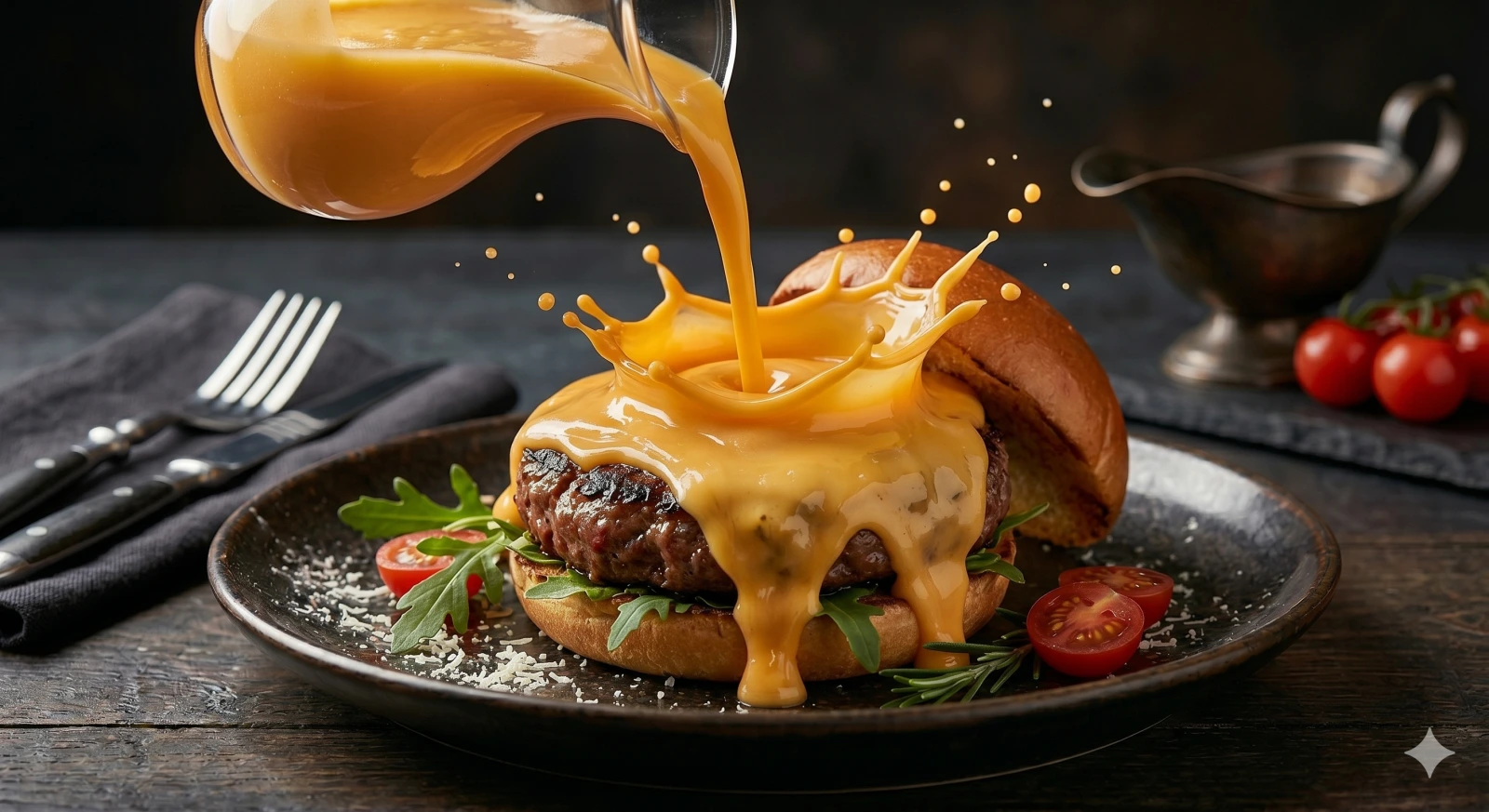
A weak food prompt only describes a static subject, such as "a burger on a table." A stronger food ad prompt makes something happen: "Stream of melted cheese being poured onto a gourmet burger."
Step 2: Add the Liquid Action
The core structure is:
Stream of [liquid] being poured onto [food subject]
This gives the image direction, motion, highlights, splash texture, and appetite appeal. Start with simple liquids such as melted cheese, chocolate sauce, maple syrup, olive oil, cream, caramel, berry sauce, coffee, or sparkling drink.
Step 3: Lock the Quality Anchors
Keep these quality anchors stable in the first version:
| Anchor phrase | What it controls |
|---|---|
| creating smooth flowing curves and splashes | Liquid arcs and controlled splash shape |
| glossy reflections | Appetite appeal and sauce highlights |
| high-speed capture | Frozen commercial motion |
| studio lighting | Clean ad-style light control |
| dark elegant background | Premium contrast and product focus |
After the first usable result, change only one or two anchors at a time. If you change the food, liquid, background, camera, and format all at once, it becomes harder to know what improved or broke the output.
Copyable Prompt Template
Stream of [liquid] being poured onto [food subject], creating smooth flowing curves and splashes, glossy reflections, high-speed capture, studio lighting, [background description], ultra-premium [style tag] advertising style, [format or aspect ratio].
Example Prompt
Stream of melted cheese being poured onto a gourmet burger, creating smooth flowing curves and splashes, glossy reflections, high-speed capture, studio lighting, dark elegant background, ultra-premium fast food advertising style, 4:3 hero image.
Step 4: Change Only Three Variables First
For the first test round, change only these three variables:
| Variable | Options |
|---|---|
| Liquid | melted cheese, chocolate sauce, maple syrup, olive oil, cream, caramel |
| Food subject | burger, waffles, ice cream, cake, pasta, packaged snack |
| Style tag | fast food, Mediterranean, breakfast, patisserie, dessert, ecommerce |
Platform format language belongs near the end of the prompt. Use "square format, 1:1 aspect ratio" for feed posts; "vertical video frame, 9:16" for Reels, TikTok, and Shorts; "app banner format, 16:9" for delivery banners; or "clean white background, product centered" for ecommerce hero images.
Image-to-Video Next Step
After choosing the best still image, upload it to Reemo image-to-video and use a short motion prompt:
Slow-motion liquid continues pouring onto the food, glossy splashes move naturally, subtle steam rises, the camera makes a gentle macro push-in, premium studio food advertising style, realistic motion, no distortion.
Start with 3-5 seconds. Check whether the liquid motion feels natural, the food subject stays stable, and the camera push-in does not distort the image.
Troubleshooting
| Problem | Fix |
|---|---|
| The liquid looks messy | Add "controlled splash arcs" and reduce the number of liquids |
| The food stops looking edible | Add texture details such as "natural bread texture" or "fresh glossy sauce" |
| The image feels generic | Add a specific cuisine, occasion, or ad category |
| The video distorts the food | Use image-to-video and add "stable food shape, no deformation" |
| The result is too busy | Remove extra props and keep one food subject, one liquid, and one camera idea |
FAQ
What is the best formula for AI food advertising prompts? Use food subject, liquid action, motion quality, lighting, background, style tag, and format. The action should come early because it tells the model what must visibly happen in the image.
Should I write the aspect ratio at the beginning of the prompt? No. Put format language near the end after the scene is clear. The model first needs to understand the subject and action.
Can this prompt work for ecommerce product images? Yes, but simplify the background. Use a cleaner phrase such as "clean white background, product centered" instead of a dark premium ad background.
How do I turn a food ad still into a short video? Use image-to-video with one simple motion: liquid continues pouring, steam rises, a light sweep moves, or the camera slowly pushes in. Do not ask for multiple scene changes in the first test.
Methodology and Update Notes
This lesson is based on Reemo internal prompt tests for food advertising still images and image-to-video first frames. It teaches a reusable prompt formula rather than a third-party benchmark.
Last reviewed: June 25, 2026. Reworked the lesson into a GEO-ready Academy template with Quick Answer, formula table, copyable prompt, troubleshooting, FAQ, and update notes.